
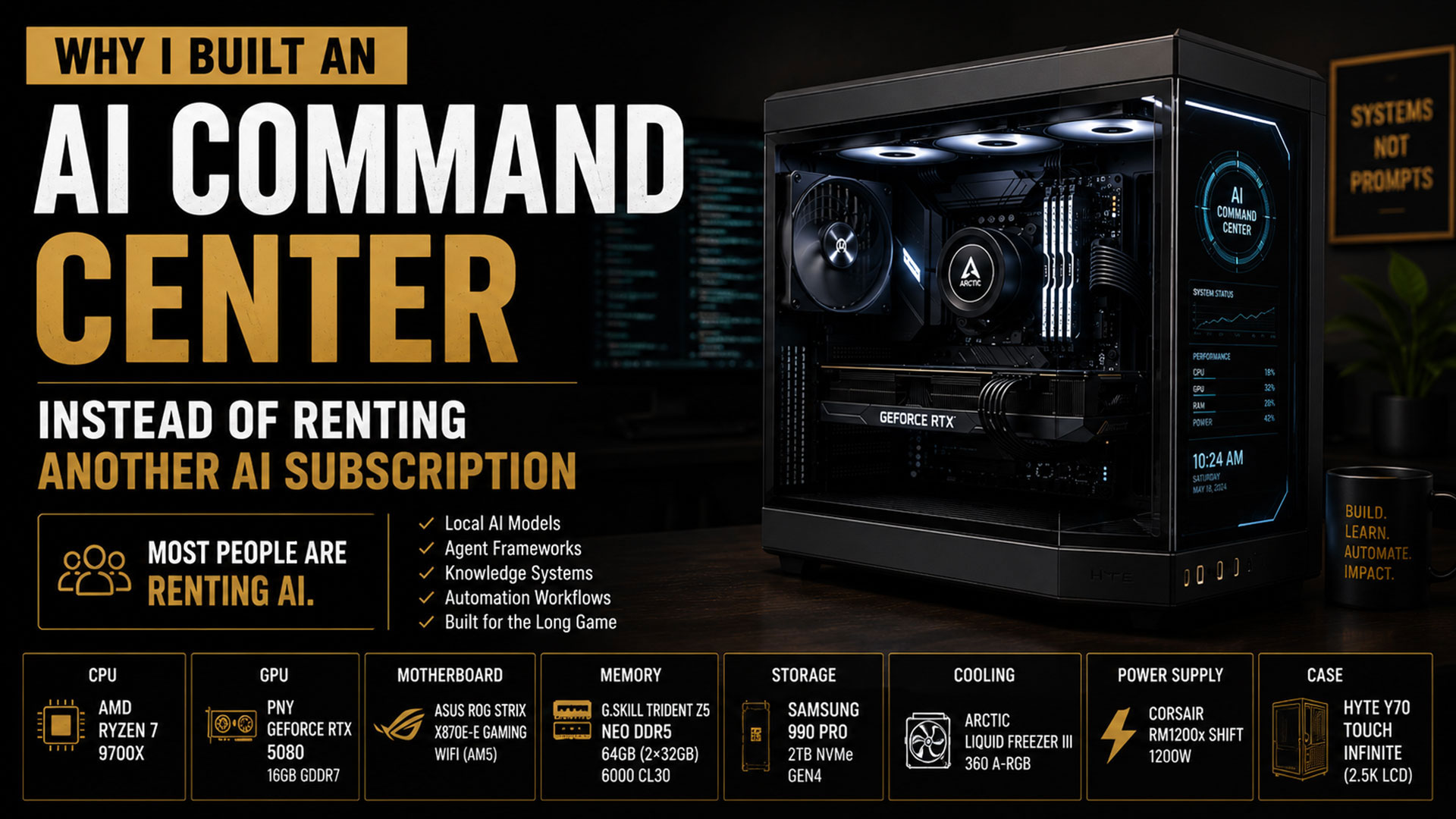
Most People Are Renting AI
When most people think about artificial intelligence, they think about ChatGPT, Claude, Gemini, or whatever model was released this week.
They open an app.
They ask a question.
They get an answer.
And that is fine. It is how I started too.
But the longer I worked with these tools, the clearer one thing became.
The future is not just about using AI.
It is about building systems with it.
Using AI means renting someone else’s intelligence by the month. Building with it means owning the infrastructure that intelligence runs on.
That difference is the whole reason for this project.
I decided to build my first AI Command Center.
Not because I wanted another computer.
Because I wanted infrastructure I control.
Why Build A Dedicated AI Machine
Most people see a computer as a tool.
I see this machine as a platform.
A platform for experimenting.
A platform for learning.
A platform for building systems that can remember, automate, assist, organize, and eventually operate alongside me.
I do not believe the future belongs to the people who know the most prompts.
I believe it belongs to the people who understand how AI systems are actually assembled.
The models matter. But they are only one layer.
Infrastructure matters.
Memory matters.
Knowledge matters.
Awareness matters.
A rented subscription gives you the model and nothing underneath it. A machine you own lets you build all the layers the model needs to become genuinely useful. That is what this build is really about.
The Build
This system was built for one purpose. AI experimentation and development. Not gaming. Not show. Every part was chosen for the same job, building and running AI systems.
I did not put this machine together myself. My friend Dave K. did. He knows hardware far better than I do, and having someone experienced on the build made the whole thing far easier.
Here is what went into it, and why each piece matters for this kind of work.
Processor (CPU)
AMD Ryzen 7 9700X (8-Core, 16-Thread)
The processor is the coordinator of the whole machine. For AI work it handles the orchestration, the data preparation, and the dozens of supporting tasks running around the models. A strong processor keeps everything moving while the heavier work happens elsewhere.
Graphics Card (GPU)
The graphics card is the engine of an AI machine. Running models locally, generating embeddings, and training or fine-tuning all lean heavily on the GPU, because this kind of work is thousands of small calculations happening at once, which is exactly what a GPU is built for. For a machine whose whole job is AI, this is the single most important part, and the one I weighted the most.
Motherboard
ASUS ROG Strix X870E-E Gaming WiFi (AM5)
The motherboard is the foundation everything else connects to. I chose it for room to grow. More memory slots, more storage, more expansion, so the machine can change as my needs change without me starting over. You do not build infrastructure to stay the same size.
Memory (RAM)
G.SKILL Trident Z5 Neo DDR5 64GB (2x32GB) 6000MT/s CL30 (AMD EXPO)
Memory is the working space the machine thinks in. Modern AI work, large models, big context, several systems running at once, eats memory fast. More of it means I can run bigger workloads and keep more in play without the machine choking.
Storage
Samsung 990 PRO 2TB NVMe M.2 PCIe Gen4 SSD
Fast storage matters more for AI than most people expect. Local models, vector databases, embeddings, and retrieval systems all read and write constantly, and slow storage becomes the bottleneck that holds everything back. Fast storage is what keeps the knowledge layer responsive.
Cooling
ARCTIC Liquid Freezer III 360 A-RGB AIO Cooler
AI workloads are not short bursts. They run hard, for a long time. That sustained load produces real heat, and heat is what quietly shortens the life of a machine and throttles its performance. Good cooling is not a luxury here. It is what lets the machine run at full effort for hours without backing off.
Power Supply
Corsair RM1200x Shift 1200W (80 Plus Gold)
The power supply is easy to underestimate and expensive to get wrong. I sized it with room to spare, partly for stability under heavy load, and partly because I know this machine is going to grow. You plan the power for the machine you will have, not just the one you have now.
Case
HYTE Y70 Touch Infinite (2.5K LCD Case)
The case is more than a box. I chose this one for airflow, for cooling, and for the space to add to the machine later. The whole build assumes expansion, so the chassis had to assume it too.
What This Machine Will Actually Do
This machine is not for gaming.
Its job is building and operating AI systems.
Some of what I plan to run on it:
- Local AI models
- Agent frameworks
- Knowledge systems
- Retrieval systems (RAG)
- Automation workflows
- Content generation pipelines
- Business operating systems
- AI awareness experiments
Each of those is a layer in something larger. This is the first step toward building real AI infrastructure, not just using AI tools.
Version 1
One thing I have learned over the years is that you do not need the perfect plan before you start.
You need a starting point.
This machine is Version 1.
The first node.
The first piece of infrastructure.
The first step toward understanding how all of these technologies actually fit together.
I have no doubt the system will change. The hardware will change. The software will change. The agents will change. The capabilities will grow.
But none of that happens unless you start. The people who wait for the perfect setup never build anything. The people who start with Version 1 end up with Version 10.
What Version 2 Looks Like
I already know where this goes next.
Version 2 of the Command Center moves to a stronger engine, the ASUS ROG Astral GeForce RTX 5090 32GB GDDR7 OC Edition. More memory, more power, more room to run larger models and heavier workloads locally. The jump from 16GB to 32GB of memory on the card matters, because bigger local models need somewhere to live.
But the 5080 in this build does not get retired. It gets redeployed.
It moves into a dedicated machine for Jarvis, my AI assistant, so Jarvis runs on its own node instead of sharing the Command Center.
That is the pattern. Nothing gets thrown away. Each piece moves up the chain as the system grows. The Command Center gets the newest engine. The previous engine becomes the foundation of the next node.
One machine becomes two. Two becomes a network. That is how real infrastructure gets built, one node at a time.
Final Thoughts
Most people are learning prompts.
I am learning systems.
This machine is part of that work.
Not because I wanted a bigger computer.
Because I want a deeper understanding of what AI is becoming, and how it can be put to work for real businesses, real people, and real problems.
The future is not AI.
The future is what we build with it.